
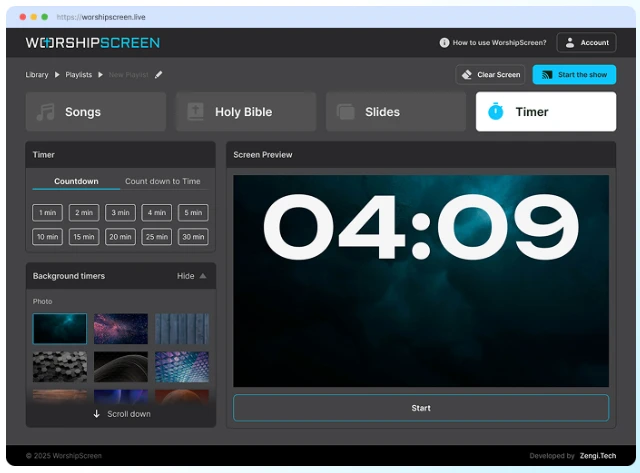
A modern church service often involves much more than preaching and worship. Churches use screens and projectors to display worship lyrics, Bible verses, sermon points, announcements, videos, images, and countdowns. Managing all of this content can become complicated when different programs and files are used for every part of the service.
WorshipScreen is a free, browser-based church presentation tool designed to make this process easier. It provides one place where a church team can prepare and control the visual content of a service. The software can be used for worship songs, Scripture, sermons, announcements, images, videos, and other presentation materials.
For churches searching for free worship software, WorshipScreen offers a simple solution that does not require traditional desktop presentation software.
What Is WorshipScreen?
WorshipScreen is church presentation software that works directly in a web browser. It is designed for worship teams, pastors, church media volunteers, and anyone responsible for displaying information during a service.
The basic idea is simple: prepare the content before the service, organize it into a playlist, and then display the appropriate material at the right moment.
A typical service can include several worship songs, Bible passages, sermon slides, announcements, videos, and a countdown. Instead of switching between multiple applications, the presentation operator can manage these elements from one platform.
Because WorshipScreen is browser-based, there is no complicated installation process. A church can use a computer connected to a projector, television, or LED display. The presentation can also be controlled from another device when the church’s setup allows it.
Why Church Presentation Software Is Important
Visual presentation has become an important part of many church services. When worship lyrics are displayed clearly, members of the congregation can participate without carrying a printed songbook. When Bible passages are shown on the screen, everyone can follow the Scripture reading together.
The same screen can also communicate announcements, display sermon information, show photographs, or provide a countdown before the service begins.
The challenge is keeping all of this content organized. A volunteer may have to manage dozens of slides during a single service. Searching for the correct file at the wrong moment can interrupt the flow of worship.
WorshipScreen addresses this problem by allowing the church team to prepare the service in advance.
Creating a Worship Song Library
One of the most useful features is the ability to create a reusable library of worship songs.
Instead of preparing the same lyrics every week, a church can add a song once and use it again in future services. Lyrics can be organized into individual slides and adjusted when necessary.
This is particularly useful for churches with a regular worship repertoire. Over time, the church can build a complete collection of commonly used songs.
When creating lyrics, readability should always be the priority. The text needs to be large enough for people sitting at the back of the church to read. A simple background and strong contrast are often more effective than excessive visual effects.
Before using a new presentation, the media volunteer should check the lyrics carefully. Typos, missing lines, or incorrect verse order can cause confusion during worship.
Preparing Bible Verses
Bible verses are another important part of a church presentation.
WorshipScreen allows Bible passages to be prepared and added to the service playlist. This means the presentation operator can have the required Scripture ready before the sermon or Bible reading begins.
For example, if a pastor plans to use several passages during a sermon, they can be prepared beforehand and placed in the appropriate order.
This saves time during the service and allows the operator to concentrate on following the speaker.
Preparing Scripture in advance is especially useful for longer sermons. Instead of searching for every passage while the pastor is speaking, the operator can simply select the next prepared verse.
The team should always verify the Bible translation and references before the service. Accuracy is more important than presentation speed.
Organizing a Complete Church Service
WorshipScreen can be used to create a complete service playlist.
For example, a Sunday service might be organized in the following order:
- Pre-service countdown
- Welcome slide
- Opening worship song
- Second worship song
- Church announcement
- Bible reading
- Sermon presentation
- Additional Scripture passages
- Closing worship song
- Final announcement
The exact order will depend on the church, but the principle remains the same: prepare the content in the sequence in which it is expected to appear.
Having everything organized before people arrive reduces the amount of work required during the live service.
Images, Videos and Announcements
A church presentation does not have to consist only of text.
WorshipScreen can also be used with images and video content. A church can display photographs from recent activities, promotional graphics for upcoming events, sermon backgrounds, or other visual materials.
Videos can also become part of a service playlist. For example, a church might show a short introduction before a special event or a video announcement between worship and the sermon.
When using online video, it is important to test the connection before the service. Internet-dependent content can create problems if the connection is unstable.
Preparing and testing media in advance is one of the simplest ways to avoid technical interruptions.
Countdown Before the Service
A countdown can help create an organized beginning to a church service.
Instead of displaying a blank screen while people are entering the building, the church can show a countdown indicating when the service will begin. A background image, church logo, or video can be used together with the timer.
This is also useful for conferences, youth meetings, prayer gatherings, and other church events.
The countdown does not need to be visually complicated. Its main purpose is to communicate clear information and help the congregation prepare for the beginning of the meeting.
Using WorshipScreen During the Service
Once the service playlist has been prepared, the operator can open the presentation and display it on the church’s main screen.
The congregation should see only the presentation, while the operator uses the control interface to manage the next slide or item.
During worship, timing is particularly important. The operator should follow the worship leader rather than simply advancing slides according to a fixed schedule.
If the worship leader repeats a chorus or changes the order of a song, the presentation operator should respond accordingly.
This is one reason why preparation and flexibility need to work together. A well-prepared playlist provides structure, while the operator can still react to changes during the live service.
Preparing for Unexpected Changes
Not every church service follows the original plan exactly.
A pastor may mention an additional Bible passage. A worship leader may repeat a section of a song. An announcement may need to be added at the last minute.
A useful church presentation system should therefore allow the operator to make changes when necessary.
WorshipScreen can support this type of flexible workflow. However, the best practice is still to prepare as much as possible before the service begins.
The goal is not to create the entire presentation live. The goal is to have a complete plan that can be adjusted when something unexpected happens.
Suitable for Different Church Traditions
WorshipScreen is not limited to one particular denomination. Its basic presentation functions can be used by many different Christian churches.
It can be relevant to Baptist, Methodist, Pentecostal, evangelical, independent, and other congregations that need to display worship songs, Bible passages, sermons, announcements, and media.
For example, churches looking for methodist worship software can use the same presentation workflow for Methodist worship services.
The software is focused on practical presentation needs rather than a particular denomination. This makes it a universal tool that can be adapted to different styles of worship.
A Practical Weekly Workflow
A simple weekly workflow can make the software much easier to use.
First, the worship team selects the songs for the upcoming service. The media volunteer checks whether the songs already exist in the library and adds any new material.
Next, the sermon passages are prepared. Announcements, images, and videos are then added to the service playlist.
After that, the operator checks the order of all elements and tests the presentation on the actual church display.
It is important to check the text from the perspective of the congregation. A slide that looks readable on a laptop may be difficult to see from the back row of a large church.
Finally, the operator starts the presentation before the service and follows the planned sequence during the meeting.
WorshipScreen and AI-Assisted Preparation
AI is becoming increasingly useful in church administration and content preparation. Artificial intelligence can help a ministry team organize information, prepare draft service plans, create announcement ideas, or structure presentation content.
However, AI-generated information should always be reviewed by a responsible member of the church team.
Bible references, worship lyrics, theological statements, names, dates, and announcements should be checked before being displayed publicly.
WorshipScreen can then serve as the practical presentation environment where approved content is organized and shown to the congregation.
This creates a useful workflow: AI and other digital tools can assist with preparation, while people remain responsible for reviewing the final material.
A Universal Tool for Church Presentations
The main advantage of WorshipScreen is its broad range of practical uses.
One service may require only worship lyrics and Bible verses. Another may need videos, announcements, images, sermon slides, and a countdown. The same platform can be adapted to both situations.
It can also be useful for churches with different technical setups. A traditional laptop-and-projector configuration can be used, while churches with large televisions or LED screens can adapt the presentation to their existing equipment.
Because the system works in a browser, it provides a straightforward alternative to complicated presentation workflows.
Conclusion
WorshipScreen is a free and universal church presentation tool for managing the visual side of worship services.
It can be used to display worship songs, Bible verses, sermon materials, announcements, images, videos, and countdowns. Churches can build a reusable song library, prepare Scripture before the service, organize complete service playlists, and control the presentation while the service is taking place.
The most effective approach is to prepare the service in advance, test the presentation on the actual church screen, and keep the operator ready to respond to changes during worship and preaching.
For churches that want a simple browser-based solution without a complicated technical setup, WorshipScreen provides a practical way to organize the visual content of a church service in one place.